iptable theory
iptables provides a userland interface to work with the netfilter Framework in the Linux Kernel.
Here’s the main docs/tutorials
iptables is composed of three concepts
tables
chains
rules
List of Tools and Files
iptables
ip6tables
conntrack
iptables-save
ip6tables-save
iptables-restore
ip6tables-restore
/sbin/iptables-save
/sbin/ip6tables-save
tables
mangle
if and how to alter one or more IP Headers of the packets. Here are the valid targets
TOS(Type of Service)TTL(Time to Live)MARKset mark values to the packet for iproute2 programs to do different routing on the packetSECMARKset security context marks on single packets for usage in SELinuxCONNSECMARKused by SELinux
nat
Network Address Translation rules, if and how to modify the source and destination IP Addresses and Ports of an ingoing / outgoing packets.
Packets in a stream only traverse this table once. We assume that the first packet of a stream is allowed. The rest of the packets in the same stream are automatically “NAT”ed or Masqueraded etc, and will be subject to the same actions as the first packet. These will, in other words, not go through this table again, but will nevertheless be treated like the first packet in the stream. This is the main reason why you should not do any filtering in this table. The PREROUTING chain is used to alter packets as soon as they get in to the firewall. The OUTPUT chain is used for altering locally generated packets (i.e., on the firewall) before they get to the routing decision. Finally we have the POSTROUTING chain which is used to alter packets just as they are about to leave the firewall.
DNATredirect the packet host and/or port to a different host behind the firewallSNATto NAT local hosts to enable them make requests to services outside of the networkMASQUERADESNAT, but the MASQUERADE target takes a little bit more overhead to compute.REDIRECT
raw
Connection tracking, marking packets to determine if or not they are part of an active
TCP connection. has only one valid target: NOTRACK
filter
used for packet filtering - decide on whether to allow a packet to continue to its intended destination, or deny it.
DROP, LOG, ACCEPT and REJECT are most common targets
There are three chains built in to this table. The first one is named FORWARD and is used on all non-locally generated packets that are not destined for our local host (the firewall, in other words). INPUT is used on all packets that are destined for our local host (the firewall) and OUTPUT is finally used for all locally generated packets
security
Set internal SELinux (Security Enhanced Linux) security context tagging, which will affect how SELinux interpret and handle these packets.
chains
these are more or less “phases” of the lifecycle of a network packet, where rules can be applied. There are five main chains.
Chains are traversed down the rules one by one, from top to bottom until the chain traversal is either ended by a a match/target or the main chain (I.e., FORWARD, INPUT, et cetera) ends. Once this happens, the default policy of the built-in chain will be applied.
- PREROUTING
Applied to any incoming packet right out of the gate, and processed before any routing can be made
- INPUT
A phase as the packet is entering the system
- FORWARDED
Chain applied when a packet is being forwarded through the System
- OUTPUT
Packet Originating from within the system and going to the outside
- POSTROUTING
Phase after routing decision has taken place, and right before the packet is put on the wire
- User defined chains
Define a new chain in a given table, and can be a target to jump to if a certain rule is matched. User specified chains can not have a default policy at the end of the chain. Only built in chains can have this. This can be circumvented by appending a single rule at the end of the chain that has no matches, and hence it will behave as a default policy. If no rule is matched in a userspecified chain, the default behaviour is to jump back to the originating chain.
rules and targets
user defined to manipulate network traffic. As each chain is called, the packet will be checked against each rule in order.
If the rule does not match, the next rule within the chain is examined. If it does match, then the next rule is specified by the value of TARGET
for example in the code below, -s 10.0.0.8 is the matching component, and
-j DROP is the target component
iptables -A INPUT -s 10.0.0.8 -j DROP
The Matching Component
Different conditions available to define rules. you can match by
Protocol (tcp, udp)
destination or source address
Destination or source port
One or more specific network interface
IP Header
The target component
The action that is triggered when the packet meets the matching criteria of the rule. There are two types of target.
Terminating Target
Non-terminating Target
Terminating target
Prevents further traversal of rules within that particular chain. Terminating Targets are
ACCEPT
DROP
QUEUE
REJECT
Jump to user-defined Chain
Non-Terminating Target
Continue traversal of rules within the chain
LOG
RETURN
Rule Syntax
Here is the basic structure of iptables and ip6tables commands
iptables -t [table] -options [CHAIN] [matching component] [target component]
- [table] can be
filter (default)
nat
mangle
raw
security
- [CHAIN] can be
PREROUTING
INPUT
FORWARD
OUTPUT
POSTROUTING
user-chain
- -options (all in uppercase) can be
-A append rule to chain
-D delete rule from chain
-I insert rule in a specific position into the chain
-R replace a rule in the chain
-Z zero counters
-L list entire table, or a specific chain ruleset
-P set default policy policy
-E rename a chain
-F flush a builtin or user-chain
-N create a new user-chain
-X delete user-chain
[matching component] can be
Generic matches
-p protocol
-s source IP
-d destination IP
-i input interface
-o output interface
Implicit Matches for TCP
-sport source port
-dport destination port
–tcp-flags
- [action component]
-j jump to target ACCEPT, DROP, REJECT, DROP which stops traversal
-j user-chaim to traverse a userchain within the given table
-l log and continue traversal
Matches
Generic Matches
# Protocol
# -p tcp / udp / icmp
iptables -A INPUT -p tcp
iptables -A INPUT ! -p udp

# Source Address / network
iptables -A INPUT -s 192.168.0.0/16

# Destination Address / network
iptables -A INPUT -d 192.168.1.1/32

# Interface in
iptables -A INPUT -i eth0

# Interface out
iptables -A FORWARD -o eth0
Protocol Specific Matches
https://www.frozentux.net/iptables-tutorial/iptables-tutorial.html#ICMPTYPES
# TCP Matches
# source port
iptables -A INPUT -p tcp --sport 22

# destination port
iptables -A INPUT -p tcp --dport 22

# TCP Flags
iptables -p tcp --tcp-flags SYN,FIN,ACK SYN

# UDP Matches
# source port
iptables -A INPUT -p tcp --sport 22

# destination port
iptables -A INPUT -p tcp --dport 22


# ICMP Matches
iptables -A INPUT -p icmp --icmp-type 8
Explicit Matches
# State matches
# --state NEW,ESTABLISHED,RELATED,INVALID
sudo iptables -t filter -A custom-input -p tcp -m state --state NEW,INVALID -j REJECT
sudo iptables -t filter -A custom-input -p icmp -m state --state NEW,INVALID -j REJECT

# limit matches
iptables -A INPUT -m limit --limit 3/hour
iptables -A INPUT -m limit --limit 5/minute
iptables -A INPUT -m limit --limit 1/second
iptables -A INPUT -m limit --limit 100/day

# Multiport matches
iptables -A INPUT -p tcp -m multiport --source-port 22,53,80,110
iptables -A INPUT -p tcp -m multiport --destination-port 22,53,80,110

# Owner Match
iptables -A OUTPUT -m owner --pid-owner 78
packet lifecycle
tables and chains diagrams
Here’s a comprehensive one from Wikipedia:
https://upload.wikimedia.org/wikipedia/commons/3/37/Netfilter-packet-flow.svg
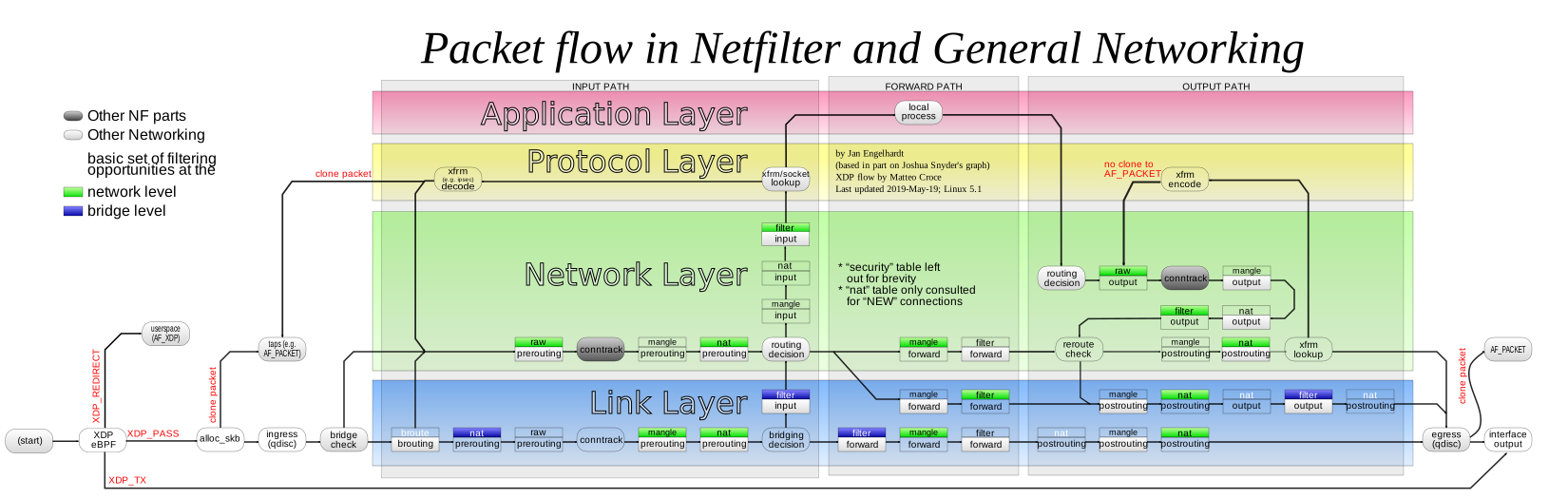
This diagram shows the chains and the tables available for each
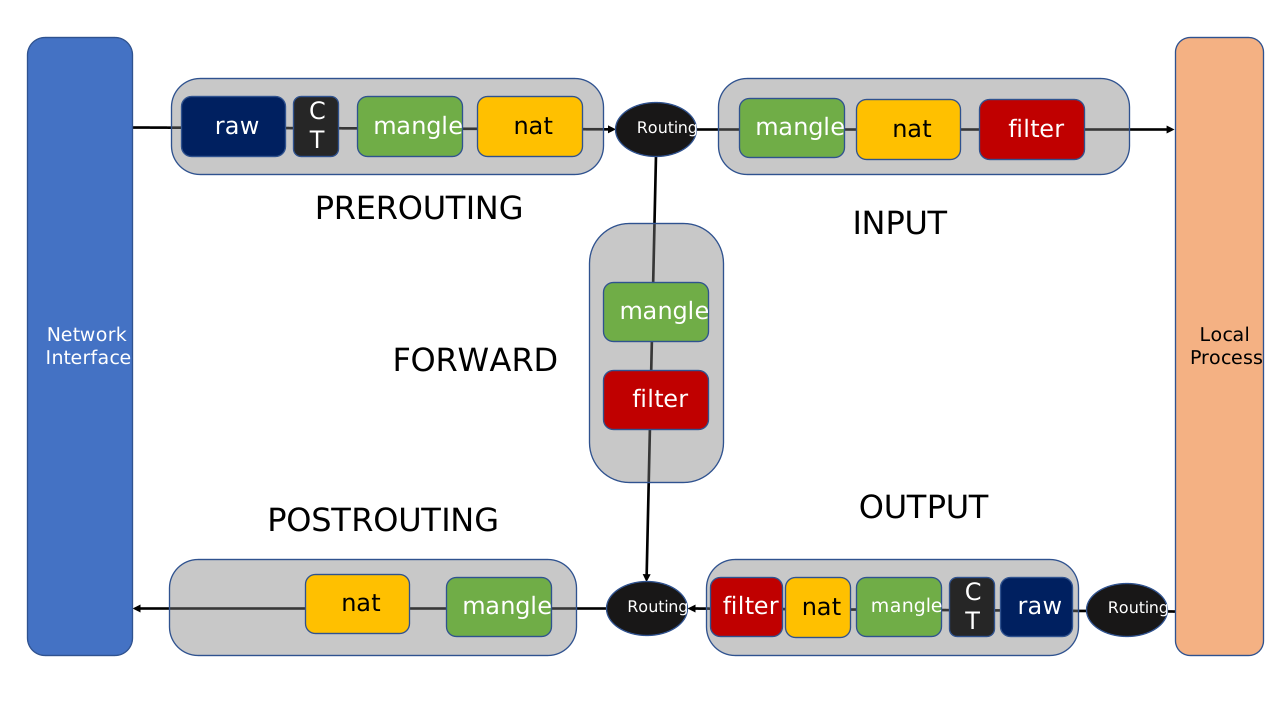
destination is the localhost
Packet is on the wire
Packet is goes through the network interface (Wired or Wireless Ethernet Hardware)
table
rawchainPREROUTINGHandle a packet before connection tracking. It can be used to set a specific connection to bypass connection trackingconntrackConnection Tracking takes place if not disabled in the previous stagetable
manglechainPREROUTINGaltering IP Headerstable
natchainPREROUTINGMainly used forDNAT. Avoid using this for filteringRouting Decision: continue on
INPUTpath orFORWARDpath based on NAT prerouting rulestable
manglechainINPUTopportunity to mangle packets after routing, but before being sent to local process on the machinetable
natchainINPUTopportunity to change source viaSNATtable
filterchainINPUTopportunity for filtering all incoming packetspacket gets sent to the intended local port/process on the machine
Source is the localhost
Local process/application, either a server, or a client initiates an IP packet specifying a destination host and port
Routing Decision - What Source Address to use, What outgoing interface to use, and other info
table
rawchainOUTPUTHandle a packet before connection tracking. It can be used to set a specific connection to bypass connection trackingconntrackConnection tracking takes place, if not disabled in the previous stagetable
manglechainOUTPUTmodify IP headers - avoid filtering in this chaintable
natchainOUTPUTprimarily forDNATtable
filterchainOUTPUTto filter outgoing packetsre-Routing Check, since the last two stages may have changed how the packet should be routed
table
manglechainPOSTROUTINGtable
natchainPOSTROUTINGprimarily forSNAT. Filtering is not recommended hereGoes out on some network interface
Forwarded Packets
Packet Goes through one network interface (eth0)
table
rawchainPREROUTINGoption to disable connection trackingconntrackHere where the non-locally generated connection tracking takes placetable
manglechainPREROUTINGchanging TOS and similartable
natchainPREROUTINGmainly forDNAT. Avoid filtering in this chainRouting Decision - either to take the
FORWARDpath reditected toINPUTpathtable
manglechainFORWARDtable
filterchainFORWARDAll filtering necessary for forwarded packetstable
manglechainPOSTROUTINGtable
natchainPOSTROUTINGmainly used forSNAT, orMASQUERADEPacket leaves through a network interface, usually a different interface eth1
connection tracking
A Connection tracking system, which enables Netfilter to determine the state of a specific connection.
Matching criteria with --state to create more refined firewall rules over the initiation
of new connections.
Connection tracking requires defragmentation of packets to work. This means that if a packet is frangmented, netfilter needs to defragment it (meaning ensure that all fragments have arrived, and re-assemble them in the proper order)
all state changes and calculations are done within the PREROUTING and OUTPUT chains of the nat table.If we send a packet from the localhost, the state is set to NEW within the OUTPUT chain, and when we receive a return packet, the state is changed in the PREROUTING chain to ESTABLISHED.
If the packet is not originating from the localhost, the NEW state is set to NEW In the PREROUTING chain, and upon a response from the local process, the state is changed to ESTABLISHED in the OUTPUT chain
- NEW
The first packet of a connection, can be set in the OUTPUT chain of the nat table when the packet is initiated locally, and in the PREROUTING chain if initiated externally. the SYN packet of the TCP protocol will have the NEW state
- ESTABLISHED
When there has been traffic in both directions (SYN then SYN-ACK). if a either an IP or ICMP packet is sent or recieved that is responded to with an ICMP packet, the connection will be considered ESTABLISHED
- RELATED
A connection that is related to another already ESTABLISHED connection. For instance, when a connection is spawned from an established connection. For example, FTP-data connections that are related to the FTP control port
- INVALID
Packet can’t be identified - better drop all packets in that state
- UNTRACKED
is the state set when the
NOTRACKtarget is matched
iptables code
listing chains
display information on current iptables status
# list all chains
sudo iptables -t filter -v -n -L

# you can omit the -t filter, since it is the default table
# -L to list
# -v verbose
# -n prevent reverse DNS lookups on IPs (btw it is slow), and just do numeric IP listing
# -t to select the table

# list specific chains
sudo iptables -t filter -v -n -L INPUT
sudo iptables -t filter -v -n -L OUTPUT

# we'll use this alot, so let's use an alias which be run with or without a chain name
alias view_chain='sudo iptables -v -n -L'

# these are the main ufw chains for ipv4 and ipv6 where user rules are listed
sudo iptables -t filter -v -n -L ufw-user-input
sudo ip6tables -t filter -v -n -L ufw6-user-input

# to list default policy of the INPUT, OUTPUT and FORWARD chains in the filter table
sudo iptables -L | grep policy

# the --line-numbers to show the rule number in corresponding chains
sudo iptables -n -L --line-numbers | grep 192.168
Configure default policies
To configure default policies.
Note
only the ACCEPT and DROP targets are available as default policies, and available only to built-in chains in the filter table
# Accept all traffic by default
sudo iptables -t filter -P INPUT ACCEPT
sudo iptables -t filter -P OUTPUT ACCEPT
sudo iptables -t filter -P FORWARD ACCEPT

# Deny all traffic by default
sudo iptables -t filter -P INPUT DROP
sudo iptables -t filter -P OUTPUT DROP
sudo iptables -t filter -P FORWARD DROP
Custom Chains
Caution
Once a custom chain is matched and is jumped to, make sure that one of the rules actually match the packet. If not, then create you can default policy at the end, which is either to DROP the packet or ACCEPT it to terminate rule matching. Otherwise an implicit or explicit RETURN target to the parent chain.
Custom output chain
Simply reject all outgoing packets
# first, let's create a user-chain in the filter table
sudo iptables -t filter -N custom-output

# then, let's add that at the very top the OUTPUT chain as a jump target
sudo iptables -t filter -I OUTPUT 1 -j custom-output

# or at the bottom
# sudo iptables -t filter -A OUTPUT -j custom-output

# on thinkpad, we can test out rejecting all outgoing traffic
sudo iptables -t filter -A custom-output ! -p udp -m state --state NEW,INVALID -j REJECT

# Append an explicit return target for clarity
sudo iptables -t filter -A custom-output -j RETURN

# review
sudo iptables -v -n -L custom-output

# remove the user-chain, clear it, then delete it
sudo iptables -t filter -D OUTPUT -j custom-output
sudo iptables -t filter -F custom-output
sudo iptables -t filter -X custom-output
Custom input chain
The example below we allow only incoming tcp and icmp packets of establish connections which are initiated locally.
Also, allow packets from localhost to localhost
# first, let's create a user-chain in the filter table
sudo iptables -t filter -N custom-input

# then, let's add that at the very top the OUTPUT chain as a jump target
sudo iptables -t filter -I INPUT 1 -j custom-input

# or at the bottom
# sudo iptables -t filter -A INPUT -j custom-input

# accept traffic from local host
sudo iptables -t filter -A custom-input -s localhost -j ACCEPT

# on thinkpad, we can test out rejecting all incoming traffic
sudo iptables -t filter -A custom-input -p tcp -m state --state NEW,INVALID -j REJECT
sudo iptables -t filter -A custom-input -p icmp -m state --state NEW,INVALID -j REJECT

# alternatively, the above two birds with one stone
# sudo iptables -t filter -A custom-input ! -p udp -m state --state NEW,INVALID -j REJECT

# Append an explicit return target for clarity
sudo iptables -t filter -A custom-input -j RETURN

# review
sudo iptables -v -n -L custom-input

# remove the user-chain, clear it, then delete it
sudo iptables -t filter -D INPUT -j custom-input
sudo iptables -t filter -F custom-input
sudo iptables -t filter -X custom-input
Recipes
Accept all loopback INPUT traffic.
sudo iptables -t filter -A custom-input -s localhost -j ACCEPT
As a server, limit outgoing traffic to only connections established by external clients
sudo iptables -t filter -A custom-output ! -p udp -m state --state NEW,INVALID -j REJECT
As a personal machine, allow incoming traffic only if connections are initiated locally
# every thing other than UDP
sudo iptables -t filter -A custom-input ! -p udp -m state --state NEW,INVALID -j REJECT

#or explicitly create two rules for tcp and icmp

sudo iptables -t filter -A custom-input -p tcp -m state --state NEW,INVALID -j REJECT
sudo iptables -t filter -A custom-input -p icmp -m state --state NEW,INVALID -j REJECT
To drop all traffic for entire networks, probably to keep out certain regions / proxies. All protocols, all ports
sudo iptables -t filter -A INPUT -s 10.10.10.0/24 -j DROP
To limit access to specific ports
iptables -t filter -A INPUT -p tcp -m tcp --dport 22 -s 10.10.0.0/16 -j DROP
TCP/UDP Port based rules
Reject sending packets to host nuc, mongo express app on tcp port 8081
# filter by IP and Port
sudo iptables -t filter -I OUTPUT 1 -d 192.168.0.249 \
    -p tcp -m tcp --dport 8081 -j REJECT
sudo iptables -t filter -D OUTPUT   -d 192.168.0.249 \
    -p tcp -m tcp --dport 8081 -j REJECT

# -p protocol is either tcp, udp or icmp
# -m extended match (beyond just IP matching).
# -m tcp additonally match with a tcp port
# --dport and --sport destination and source port respectively

# port can be specified as "ssh" or port number "22"
# -dport stands for destination port
iptables -t filter -A INPUT -p tcp -m tcp --dport ssh -s 10.10.0.0/16 -j DROP
iptables -t filter -A INPUT -p tcp -m tcp --dport 22  -s 10.10.0.0/16 -j DROP

# undo these rules
iptables -t filter -D INPUT -p tcp -m tcp --dport ssh -s 10.10.0.0/16 -j DROP
iptables -t filter -D INPUT -p tcp -m tcp --dport 22  -s 10.10.0.0/16 -j DROP
Delete Backup and Restore Rulesets
before you flush, better backup
mkdir backup
sudo iptables-save > backup/ip4.dat && sudo ip6tables-save > backup/ip6.dat

# flush all rules in the OUTPUT chain
sudo iptables -t filter -F OUTPUT

# review what we did
sudo iptables -t filter -v -n -L OUTPUT

# to restore everything back from a previous state
sudo iptables-restore < backup/ip4.dat && sudo ip6tables-restore < backup/ip6.dat
Twitter
assuming these two main twitter IPs closest to Marblehead
104.244.42.193
104.244.42.65
Then let’s try to block outgoing traffic to 104.244.42.0/24
# block traffic to nuc:8081
sudo iptables -t filter -A my-output-chain -d 192.168.0.249 \
    -p tcp -m tcp --dport 8081 -j REJECT

# block traffic to twitter network
sudo iptables -t filter -A my-output-chain -d 104.244.42.0/24 -j REJECT

# return to previous chain
sudo iptables -t filter -A my-output-chain -j RETURN

# to undo all of that
sudo iptables -t filter -F my-output-chain
filtering based on connection state
In the following example, we allow nuc to work as an ssh server, but not itself initiate SSH connections to other hosts. Here we rely on TCP state (NEW vs ESTABLISHED) to allow only establish connections (when the TCP handshake has been initiated by the other host), and reject when SSH connection is initiated locally (NEW TCP Connection state)
# first, let's create a chain in the filter table
sudo iptables -t filter -N my-output-chain

# then, let's add that at the very top of the OUTPUT chain as a jump target
sudo iptables -t filter -I OUTPUT 1 -j my-output-chain

# clear the chain if needed
sudo iptables -t filter -F my-output-chain

# allow responding to all incoming SSH connections, that are initated by the other host
sudo iptables -t filter -A my-output-chain -p tcp -m tcp --sport 22 \
    -m state --state ESTABLISHED -j ACCEPT

# reject the initiation of SSH connections from the local host based on TCP connection state
sudo iptables -t filter -A my-output-chain -p tcp -m tcp --dport 22 \
    -m state --state NEW -j REJECT

# jump back to original chain to process other rules if needed
sudo iptables -t filter -A my-output-chain -j RETURN

# review the chain
sudo iptables -t filter -v -n -L my-output-chain

sudo iptables -t filter -v -n -L OUTPUT

# remove the chain
sudo iptables -t filter -D OUTPUT -j my-output-chain

# Flush and delete the chain
sudo iptables -t filter -F my-output-chain
sudo iptables -t filter -X my-output-chain
Persisting Firewall Changes
Caution
best to keep a backup before persisting changes, especially if you mess with ufw and docker chains
# Save changes, otherwise they get lost upon restart
sudo /sbin/iptables-save && sudo /sbin/ip6tables-save
Routing
port redirection on the same host
sudo iptables -t nat -A PREROUTING -p tcp --dport 9000 -j REDIRECT --to 8888

sudo iptables -t nat -D PREROUTING -p tcp --dport 9000 -j REDIRECT --to 8888
NAT Network Address Translation
routing to a different hose. DNAT to route to a different hose SNAT changes the source address to this host, which will then be automatically routed back to the original client
sudo iptables -t nat -A PREROUTING -p tcp -m tcp --dport 9000 -j DNAT \
    --to-destination 192.168.0.249:8081
sudo iptables -t nat -A POSTROUTING -d 192.168.0.249 -p tcp -m tcp --dport 8081 -j SNAT \
    --to-source 192.168.0.190

sudo iptables -t nat -D PREROUTING -p tcp -m tcp --dport 9000 -j DNAT \
    --to-destination 192.168.0.249:8081
sudo iptables -t nat -D POSTROUTING -d 192.168.0.249 -p tcp -m tcp --dport 8081 -j SNAT \
    --to-source 192.168.0.190
As you can see, SNAT is inconvenient in that the current host needs to explicitly specify its own static IP. the MASQUERADE target dynamically changes the source address to the right value in runtime
- MASQUERADE
MASQUERADE is an iptables target that can be used instead of SNAT target (source NAT) when external ip of the inet interface is not known at the moment of writing the rule (when server gets external ip dynamically).
- Some good resources
sudo iptables -t nat -A PREROUTING -p tcp -m tcp --dport 9000 -j DNAT \
    --to-destination 192.168.0.249:8081
sudo iptables -t nat -A POSTROUTING -d 192.168.0.249 -p tcp -j MASQUERADE

sudo iptables -t nat -D PREROUTING -p tcp -m tcp --dport 9000 -j DNAT \
    --to-destination 192.168.0.249:8081
sudo iptables -t nat -D POSTROUTING -d 192.168.0.249 -p tcp -j MASQUERADE
docker iptables config
https://gist.github.com/x-yuri/abf90a18895c62f8d4c9e4c0f7a5c188
Here’s a good discussion about it, especially if you mess up the docker routing rules